
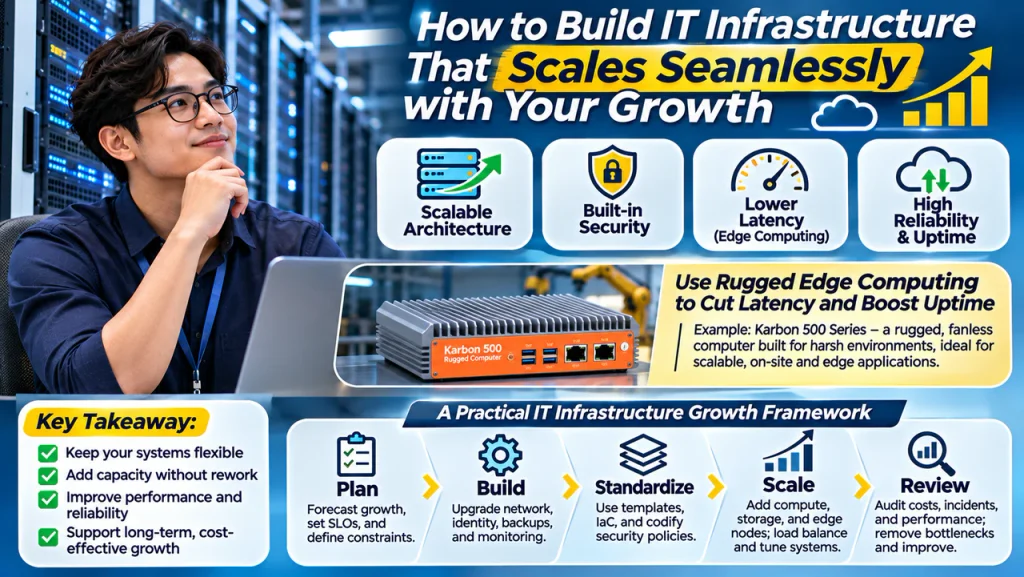
For founders and IT leaders at growing businesses, the hardest part of scaling is that the cracks often stay hidden until demand spikes. IT system bottlenecks show up as slow apps, fragile integrations, inconsistent access, and support tickets that multiply faster than headcount. These scalable IT infrastructure challenges create real IT infrastructure growth impact: teams hesitate to ship, customer experience slips, and business technology scalability becomes a constraint instead of a lever. The goal is an infrastructure foundation that expands cleanly as the business does.
Understanding Scalable IT System Principles
Scalable infrastructure is less about buying bigger gear and more about keeping options open. In practice, it means connecting cloud services thoughtfully, building security into everyday workflows, and designing a network that can change without breaking. The goal is to expand capacity and capability without rewiring everything each time the business shifts.
This matters because growth rarely follows a straight line. Flexible choices prevent emergency rebuilds, reduce downtime, and keep teams productive when usage spikes. A clear inventory of your IT infrastructure helps you spot what must scale first, including networking components and data storage.
Think of it like remodeling a storefront while staying open. You add modular shelves, install better locks, and keep pathways wide so traffic can increase. Many teams start with an IT infrastructure checklist to avoid missing critical pieces.
Use Rugged Edge Computing to Cut Latency and Boost Uptime
Once you’ve built on scalable principles like adaptable architecture and security, performance often comes down to where your data gets processed. Edge computers help you process and analyze data close to the source, so your systems can stay responsive as you add more devices, locations, and data-heavy workloads. Instead of sending everything back to a central server or cloud region, on-site computing reduces data processing latency and keeps operations running even when connectivity is inconsistent, an important reliability boost as your infrastructure grows.
For a practical example, the Karbon 500 Series rugged computers deliver scalable performance and durability for harsh industrial and mobile environments. Built to withstand shock, vibration, and wide temperature ranges, they provide powerful computing in a compact, highly configurable platform suited to demanding edge applications such as automation, transportation, and machine vision. If you’re evaluating fanless, on-site hardware options, the Karbon 500 rugged computer is one place to see how a configurable edge platform can fit into tougher deployments, including “Karbon rugged computers that withstands vibrations, heat and dust”.
Plan → Build → Standardize → Scale → Review
To keep your infrastructure evolving without constant rework, use this staged rhythm each time the business grows. It turns scaling into a repeatable set of decisions so capacity, reliability, and security move forward together. This is the practical side of scalability planning: making growth predictable instead of disruptive.
| Stage | Action | Goal |
| Plan the next growth phase | Forecast users, data, sites; define SLOs and constraints | Clear targets and guardrails for change |
| Build a stable baseline | Upgrade network, identity, backups, monitoring; document defaults | Fewer surprises as load increases |
| Standardize and automate | Use templates, IaC, golden images; codify security policies | Repeatable deployments across teams |
| Scale capacity deliberately | Add compute, storage, edge nodes; load balance; tune databases | Performance holds under new demand |
| Review and tighten | Audit costs, incidents, telemetry; remove bottlenecks; update runbooks | Continuous improvement and lower risk |
Planning sets measurable targets, then baseline work makes the environment dependable enough to standardize. Standardization makes scaling faster, while reviews feed lessons back into the next plan so growth stays controlled.
Scaling IT Infrastructure: Questions Leaders Ask
Q: How do I future-proof without overbuilding and wasting money?
A: Buy flexibility, not max capacity. Use modular services, standard images, and automation so you can add resources in small steps. A practical next move is to set clear reliability targets and make every new purchase or service match them.
Q: When should we bring in dedicated IT help versus “winging it”?
A: If outages, security tasks, or onboarding are slowing revenue work, you are past the DIY stage. 27% of small businesses don’t have IT support, and many end up paying for it through downtime and rushed fixes. Start with part-time or managed support focused on monitoring, backups, and patching.
Q: Why does performance drop after we add users, even if we upgraded servers?
A: The bottleneck is often the database, network, or a single shared service like identity or storage. Check metrics for saturation, queueing, and slow queries, then fix the tightest constraint first. Treat it like a diagnosis, not a blanket upgrade.
Q: Should we migrate to cloud to scale, or can on-prem still work?
A: Either can scale if you standardize configurations and automate deployments. Cloud helps when demand is spiky or you need speed, while on-prem can fit stable workloads with strong ops discipline. Decide based on compliance, latency, staffing, and how fast you need to ship changes.
Turn Growth Into a Scalable IT Infrastructure Plan
Growing companies often feel the tension between moving fast today and avoiding fragile systems tomorrow. The most reliable way through is growth-aligned IT planning: treat infrastructure as a long-term IT strategy, guided by clear tradeoffs and IT infrastructure key takeaways rather than last-minute fixes. Applied consistently, the scalable system benefits show up as smoother launches, fewer fire drills, and business technology application that keeps pace with demand. Build for the next stage, not the last emergency.