
A document often arrives at the least convenient moment: a contract in an airport, a spreadsheet during a client visit, or a PDF that needs signing before a meeting. Huawei users abroad do not need a complicated workaround. With the right installation route and a few sensible settings, WPS Office can become a dependable mobile workspace.
Install WPS Office from AppGallery
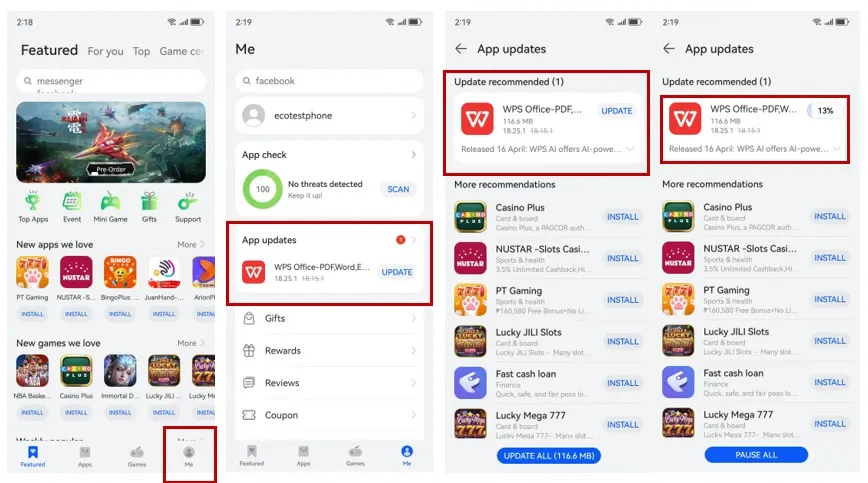
Start with HUAWEI AppGallery, the official app store on the phone. Search for “WPS Office,” check the publisher and app details, then tap Install. The Huawei Community walkthrough for huawei wps follows the same simple sequence: open AppGallery, find WPS Office, install it, and launch the app after the download is complete.
Using the official store is the most practical approach because it keeps the installation source clear and makes future updates easier to manage. If the app does not appear, confirm that AppGallery is updated and that the HUAWEI ID region matches the country where the device is being used.
Open the files people actually send
Once installed, WPS Office can handle common documents, spreadsheets, presentations, and PDFs in one place. Open attachments from email, a browser, a local messaging app, or the Files app. When Huawei asks which app should open the file, choose WPS Office and set it as the default only when that suits your workflow.
A good huawei wps setup is especially useful overseas, where schools, employers, banks, hotels, and public services may send files in different formats. Save an important copy to local storage before a flight or a long commute so the document remains available without a reliable connection.
Set permissions without giving away too much
Allow access only to the folders, photos, microphone, or camera functions you genuinely need. Storage access is necessary for opening and saving local documents, while camera access may be useful for scanning a receipt or paper form. Review cloud sign-in and synchronization options before uploading confidential work.
If a file will not open, first check whether the download finished correctly. Then rename unusually long filenames, free some storage, update WPS Office through AppGallery, and try again. Complex fonts, macros, or desktop-only layouts may still need checking on a computer before final submission.
A simple office solution for daily travel
The best mobile setup is the one that stays predictable: install from AppGallery, keep the app current, store essential files offline, and use trusted sharing channels. For the original installation steps, follow thehuawei wps guide and complete the setup before the next urgent attachment reaches your phone.