
With digital transformation gaining momentum, IT teams from across all industries are scrambling to update their infrastructures to alleviate technical debt and gain operational agility. The path? Cloud. Among cloud platforms, Azure cloud migration still presents the best hybrid capabilities, Azure migration tools, is enterprise-compliant, and seamlessly integrates into the Microsoft ecosystem.
However, cloud migration does not just imply flipping a switch. A bad migration can mean downtime, security risks, and uncontrollable costs. That is why the right Azure migration services tool and strategy become important.
This guide covers the essential Azure migration services and tools an IT team must know in 2025. Whether you are planning to migrate into Microsoft Azure for the first time or scale operations already in the Cloud, this information will give you enough confidence to sail through your journey. We will also respond to some key FAQs and apply some best practices to make your transition to the Cloud easier.
Why Should One Migrate to Microsoft Azure in 2025?
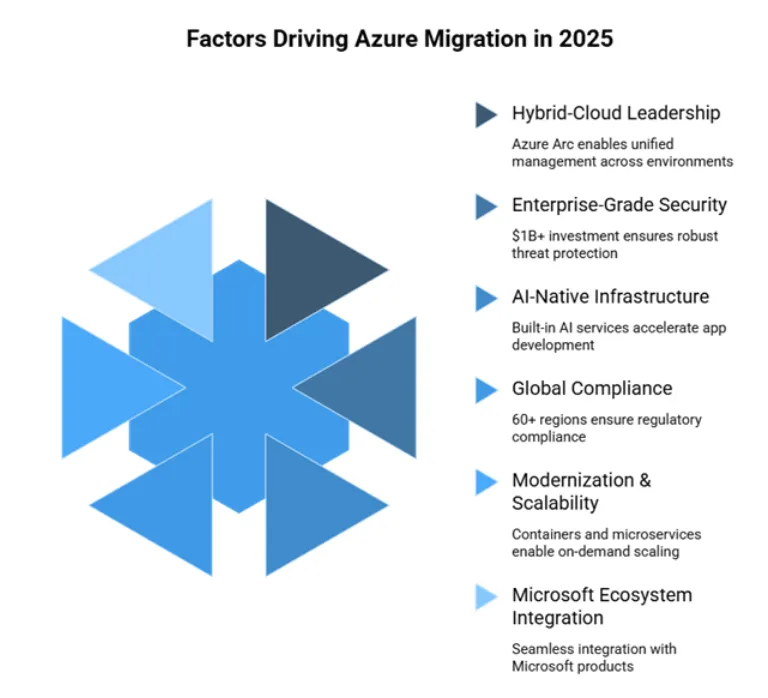
- Azure Hybrid-cloud Strength
Azure leads the way in hybrid cloud solutions, providing services like Azure Arc to enable unified management across on-premises, multi-cloud, and edge environments.
- Enterprise-Grade Security
Microsoft invests over $1 billion annually in cybersecurity, with built-in threat protection, encryption, and compliance for over 100 global certifications.
- AI-Native Infrastructure
Azure is baked with AI services, machine learning, and Azure migration services tools, providing easy ways to create and grow intelligent applications.
- Worldwide Data Residency and Compliance
Azure has 60+ regions worldwide, thus guaranteeing data residency, compliance, and sovereignty for regulated industries such as healthcare and finance.
- Modernization and Scalability
Azure allows legacy systems to be modernized using containers, serverless functions, and microservices while ensuring you scale on demand.
- Integration with the Microsoft Ecosystem
Azure integrates natively with tools your teams already use; Microsoft 365, Power Platform, and Dynamics 365 should all experience a smooth migration and adoption.
Azure Migration Strategy – Where to Start?
Any migration needs to be based on sound planning. Whether you’re migrating a handful of virtual machines or the re-architecture of an entire application stack, a well-formed migration strategy ensures everything is done with minimal risks and maximum results.
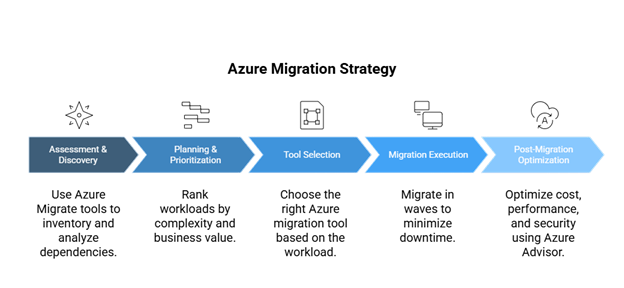
Step 1: Assessment & Discovery
Start by identifying all assets in your current environment, applications, databases, virtual machines, and workloads. Utilize discovery and assessment tools from Azure Migrate to analyze dependencies, usage patterns, and readiness.
Step 2: Planning & Prioritization
Not all workloads are created equal. Rank based on complexity, business impact, and compliance requirements. Lift-and-shift-as may apply for some, and others might require some refactoring.
Step 3: Tool Selection
Select the Azure migration tool according to what you are migrating. Azure Migrate can migrate servers, databases, web apps, and VDI environments. Specialized migration tools might be necessary for SAP, VMware, and mainframe workloads.
Step 4: Migration Execution
Follow a phased or wave-based approach to cut downtime, maintain data integrity, automate, and monitor migration with Azure tools.
Step 5: Post-Migration Optimization
After you go live, optimize costs, performance, and security using Azure Advisor, cost management dashboards, and governance policies.
Keeping your migration on track requires building a custom Azure migration checklist, from discovery to post-go-live support. The checklist will help align stakeholders, reduce friction, and speed up time to value.
Top Azure Migration Tools You Should Know in 2025
Besides requiring a strategic road map, cloud migration must be carried out using the right tools to assure secure, cost-efficient transitions that don’t disrupt ongoing business activities. Microsoft offers the great Azure migration toolset to facilitate IT teams in every part of the journey, from assessment to final execution.
Following is a review of some of the more important Azure migration services and tools that enterprise IT teams will embrace in 2025.
1. Azure Migrate Tool: Central Hub of All Migration Operations
It is the main cloud migration console. It supports everything from discovery and assessment to replication and testing so that IT teams have full visibility of their migration undertakings.
Use Cases:
- Migration of virtual machines (VMs), databases, web applications, and servers to Azure
- Pre-migration assessment for risk minimization
Key Features:
- Central dashboard for all migration tracking activities.
- Integration with other Azure tools such as Azure Site Recovery and Azure Database Migration Service
- Mapping dependencies and providing readiness insight for potential project design
Whether converting just a few VMs or operating at enterprise level, the tool eases execution and ensures that migration objectives are in line with business objectives.
2. Azure Data Migration Services (DMS): Provides a Smooth Database Migration
DMS is a fully managed service that lets customers roll their on-premises databases into the Cloud with little downtime.
Use Cases:
- Moving a SQL Server, Oracle, MySQL, and PostgreSQL databases to Azure SQL or managed instances
- Supports both homogeneous and heterogeneous migrations.
Key features:
- Supports online migration with minimal downtime and offline migration
- Guides workflow to ease complex database migration
- Supports schema and data migration as a unified approach
DMS works best for time consideration, performance, and maintaining data integrity.
3. Azure Data Migration Assistant (DMA): Pre-Migration Assessment and Compatibility Checks
Before you really get into your database migration, you’ll want to understand whether Azure can support your existing systems. Azure Data Migration Assistant (DMA) is a lightweight downloadable tool that checks and assists in determining readiness.
Use Cases:
- Performing early-stage compatibility assessment
- Recognizing deprecated features, breaking changes, or unsupported items
Key Features:
- Scan SQL Server instances and reports feature parity-related issues
- Provide recommendations to overcome these compatibility problems
- Help in capacity planning and early decision making for migration
Configurations help teams avoid risks prior to execution by assuring readiness of the server for migration.
4. Azure Data Box: Secure Offline Migration of Large Datasets
It is a physical device offered by Microsoft for large-scale data transfer offline ideal when bandwidth is limited or security is an issue.
Use Cases:
- Large dataset uploads (media, backups, archives) to Azure
- Where Internet connectivity is shaky and on account of compliance regulations
Key Features:
- Encrypts data during transport
- Supports up to 80 TB of data per device
- Microsoft picks up the device and returns it to the data center.
It is a viable alternative to online migration for organizations dealing with terabytes or petabytes of data.
5. Azure Site Recovery (ASR): Supporting Migration and Business Continuity
In designing, ASR was supposed to be a disaster recovery tool; lately, however, it has increasingly been used for lift and shift migrations of virtual machines.
Use Cases:
- Replicate from VMware, Hyper-V, or physical environments into Azure.
- Ensure that workload remains highly available throughout and after migration.
Key Features:
- Continuous replication blocking has minimal impact on production workloads.
- Automate failover and failback
- Testing non disruptively for validation before cutover
IT teams should seek continuity of business and seamless ways or mediums to shift workloads to the Cloud.
6. Microsoft Migration Services: White-Glove Assistance for Complex Environments
Microsoft Migration Services is an umbrella term for professional services to help organizations negotiate massive and complex migrations. These services are usually engaged by enterprises with legacy systems, industry-compliant requirements specific to their line of work, or multi-region workloads.
Use Cases:
- Developing a long-term migration roadmap with Microsoft engineers
- Migrating business-critical apps such as SAP or mainframe systems
Key Features:
- Tailored assessments and architecture reviews
- Directly access FastTrack for Azure and certified partners.
- Hands-on assistance for planning execution, and optimization
This is particularly worthwhile in times when in-house cloud skills are in short supply or when a phased migration is required for global operations.
Use Case: Choosing the Right Azure Migration Tool Based on Your Scenario
Each cloud migration project is unique in terms of infrastructure complexity, app dependencies, compliance requirements, and timelines. Microsoft offers different tools for cloud migration to fit every scenario: virtual machines, databases, or just plain bulk data migrations.
Here is a quick comparison to help you pick the best Azure migration tool according to your individual needs:
| Scenario | Best Tool(s) |
| VM Lift & Shift | Azure Migrate, Azure Site Recovery (ASR) |
| Database Migration | Azure Database Migration Service (DMS), DMA |
| Bulk File Transfer | Azure Data Box |
| Disaster Recovery | Azure Site Recovery (ASR) |
| Full Stack Assessment & Execution | Azure Migrate + Microsoft Migration Services |
- In larger enterprise projects, it is not uncommon to find hybrid usage of the tools. For example:
- Azure Migrate can perform discovery and assessment.
- DMS is used for migrating structured databases.
- ASR is used for continuous replication of virtual machines.
- Azure Data Box is employed first for massive offline data transfers, and the online sync tool is used to update the changes.
- Enterprises with legacy systems or compliance-heavy workloads would most likely plan for full-scale migrations with Microsoft Migration Services, combining some Azure tools in the mix.
- Hybrid tools provide flexibility and reduce risk while controlling costs and downtime during migration.
Conclusion
Successful cloud migration is not just about migration but about getting it right. With clever planning and the right Azure migration tool, IT teams can achieve an easier, faster, and more secure transition to the Cloud.
Whether it is virtual machines, databases, or huge data sets, picking the right array of Azure migration tools is the single most crucial factor in minimizing downtime and protecting data integrity for getting farther on with business goals. Azure Migrate, Azure Database Migration Service, and ASR are designed in unison and provide flexibility and control throughout the migration lifecycle.
Your migration strategy must also represent what your technical architecture looks like today and farther along the line, supporting your scaling and operational needs. With Microsoft working harder than ever to push its migration ecosystem, the grass is always greener for anyone who stays on top of it and becomes savvy in the tools.
Frequently Asked Questions
Q1. What is the best Azure migration tool for 2025?
The right Azure migration tool in 2025 depends on individual cases. Given its versatility, Azure Migrate is the ideal choice for full-stack cloud migrations that include servers, virtual machines, and applications. Azure Database Migration Service (DMS) stays true to its purpose if we rent something to transfer the databases. Most of the time, several Azure migration tools are used in conjunction with enterprise-level success.
Q2. Is Azure Migrate free of charge?
Yes, it is an Azure migration tool free of charge, Azure Migrate for assessment, discovery, and planning components. It allows you to analyze on-premises environments with no upfront costs. However, certain advanced features or perhaps third-party integrations within the Azure Migrate ecosystem may carry a price tag based on utilization.
Q3. How do you safely migrate databases to Microsoft Azure?
The most secure method for migrating databases is Azure Database Migration Service, a trusted Azure migration tool for smooth transfers. It moves data through encryption, supports integration into identity controls such as Azure Active Directory, and supports online and offline migration modes to help keep downtime and risk to the lowest levels possible.
Q4. What is the difference between Azure Migrate and Azure Data Migration Services?
Both of these Azure migration tools are important, but they have different meanings. Azure Migrate is a centralized service for assessing and planning a migration to the Cloud for workloads. On the other hand, DMS implements the efficient transfer of databases in security to Azure.
Q5. Does Azure Data Box operate in India or any remote location?
Yes. It is a physical Azure migration tool that is available in India and other remote areas. It is best suited for offline data transfers of gigantic scales when bandwidth limitations become an issue. Microsoft manages shipping securely and storage encryption to uphold compliance during migration.
Q6. What should be included in the Azure migration checklist?
It should include discovering the environment using the Azure Migrate tool, preparing the database with DMA, assessing the right Azure migration tools for each workload involved, ensuring the backup and failover plan, and, of course, performing post-migration testing. A complete checklist ensures success and minimizes risk during the transition to the Cloud.
About the Author:
Manish Gidwani is the Co-Founder of Bloom Consulting Services, where he works as an Azure Solutions Architect. With expertise in Azure Migration, DevOps, Managed Services, and AI & Cognitive Services, he helps businesses modernize their IT landscapes and drive digital transformation. Passionate about cloud innovation, Manish guides organizations in leveraging Microsoft Azure to achieve scalability, efficiency, and long-term growth.
LinkedIn Profile: https://www.linkedin.com/in/manishgidwani/